Payments · PRACTICAL GUIDE
How to use Alipay with a foreign card in Shanghai
In this guide
Your first airport transfer or meal is easier when you have already prepared a way to pay. This guide gives you a setup path and an arrival backup. Linking a card at home is preparation; confirm that it works with a small merchant purchase after arrival.
Prepare one payment app, keep access to your bank's verification number, and carry a second way to pay.
1. Prepare Alipay before departure
Shanghai's official guide confirms that Alipay has an English interface and supports registration with an overseas number. Add your card through Me → Bank Cards; eligibility also depends on your issuer.
Use the current app prompts. The official illustration below is an older interface example, so labels and verification checks may differ.
- Install the official Alipay app and register using a mobile number you can still access during your trip.
- Open Me → Bank Cards and follow the prompts to link your card.
- Complete the identity and bank checks requested inside the official app.
- Save your bank's support contact and prepare a backup card or cash.
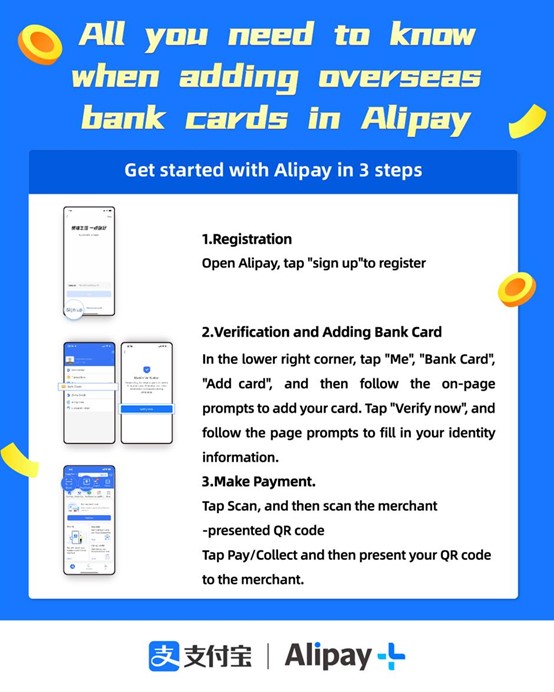
Official illustration: Alipay / International Services Shanghai
2. Know which payment action to use
At the shop, check what the cashier expects before opening your code.
Swipe sideways to see all columns →
| Situation | What to do |
|---|---|
| The merchant displays a payment QR | Use Scan, check the merchant and amount, then confirm. |
| The cashier asks to scan your phone | Open your payment code and show it to the cashier. |
| You are entering the metro | Use a Shanghai transport code or a ticket; a shop-payment code is different. |
3. Keep Weixin Pay as another option
For Weixin Pay, the official card-linking path is WeChat → Me → Services → Wallet → Bank Cards. Follow the app's checks. It also supports scanning the merchant's code or showing your own payment code.
Preparing a second app can give you another option, but a problem with the underlying bank card can affect both. Keep a separate payment backup. Use these instructions for merchant purchases; card linking does not establish support for transfers to another person.
4. If setup or a payment fails
These are troubleshooting checks, not a diagnosis of your card or account. Use the error shown in the app when speaking with support.
Swipe sideways to see all columns →
| Problem | Next check |
|---|---|
| No verification SMS arrives | Check the country code and access to that number. Ask your mobile operator or bank about message delivery before requesting more codes. |
| Your card will not link | Recheck the details and name you entered. Ask the issuer whether this card can be used with the wallet and what its error means. |
| A linked card is declined at a shop | Check the selected card, connection and displayed error. Ask the cashier about another accepted payment method, then contact your bank. |
| The QR code does not complete payment | Check whether this is a merchant payment or another type of code. Do not assume a foreign card supports every wallet feature. |
| Your phone is offline or out of battery | Use your prepared payment backup and saved destination. Ask airport or accommodation staff for help. |
5. Fees, arrival help and a first test
Before confirming, read the amount and any fee displayed by the app. Ask your issuer about currency conversion and foreign-transaction charges; do not use a generic fee claim as a quote for your own card.
Shanghai's official guide lists payment assistance in the international arrival halls of Pudong T1/T2 and Hongqiao T1. Ask the service center if setup is still unresolved.
Once settled, try a small ordinary merchant purchase. Confirm it succeeds before relying on the app for a larger bill. This site never needs your card number, verification code or identity-document images.
CHECK THE DETAILS
Sources & current information
Source information checked on 2026-10-03. Check changing details for your own trip using these links.